
X Y Z, and Tran Vert Long
Why the channels read X, Y and Z, how a true transverse, vertical and longitudinal frame is resolved from the record itself, and how to check or correct it in the Orientation dialog.
A vibration recorder is a tri-axial accelerometer. It writes three channels, X, Y and Z: the chip's own axes. It can lie at any angle, and nobody aims it at the shot. So the analyser reads a record as X Y Z by default, and never calls a channel transverse, vertical or longitudinal on the strength of which axis it is.
What does not depend on how the unit was lying
The peak vector sum is the size of the whole 3D motion at its largest. Turning the frame cannot change it. It is the figure to reach for when you want one number that means the same thing for every unit on a blast.
A component peak is different: it is how much of that 3D motion falls along one chosen direction, so it depends on the direction. Ground motion of 10 mm/s along a line halfway between X and Y reads 7.07 on X and 7.07 on Y. Read along that line instead, it is 10 on one channel and nothing on the other. The vector sum is 10 both times. Whatever the frame, the largest of the three component peaks sits somewhere between the vector sum and about 58 % of it; a single component can be close to nothing.
Tran, Vert and Long, resolved from the record
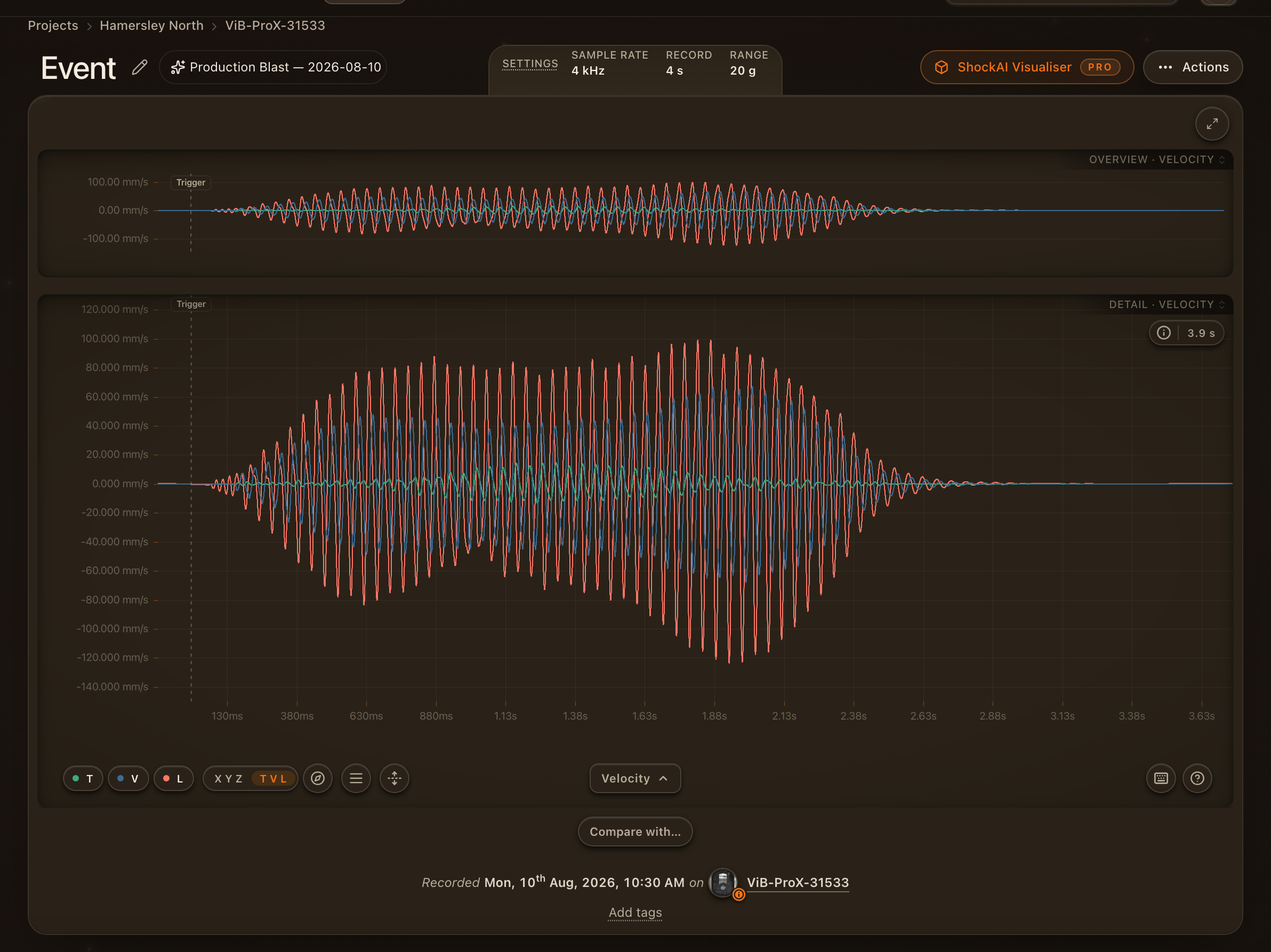
Where it is offered, the X Y Z | T V L control on the chart toolbar switches the whole analyser, traces, channel pills, measurements, particle motion and the compliance cards, into a true transverse, vertical and longitudinal frame. It is a rotation of the 3D record, not a renaming of channels:
- Vert is gravity. At rest, an accelerometer reads one g along whichever way is up, and every record carries that reading in its header. No assumption is made about which way the lid faced.
- Long is the direction the ground motion travelled, outward from the shot, found in the level plane from the record's own motion: the first arrival, and the main axis the horizontal motion lies along.
- Tran is square to both.
No compass is involved. The unit's magnetometer is not used.
T V L is greyed out, with the reason, for a peak-vector-sum capture (one trace, nothing to rotate), for a record whose header has no usable static g, and for a record analysed by an older chain, where rotating the traces would only be approximate: update it to the latest analysis first. An orange dot on T V L means the calculation was uncertain and should be checked.
Checking and correcting it
Press Shift+O, or the compass beside the control, for Orientation.
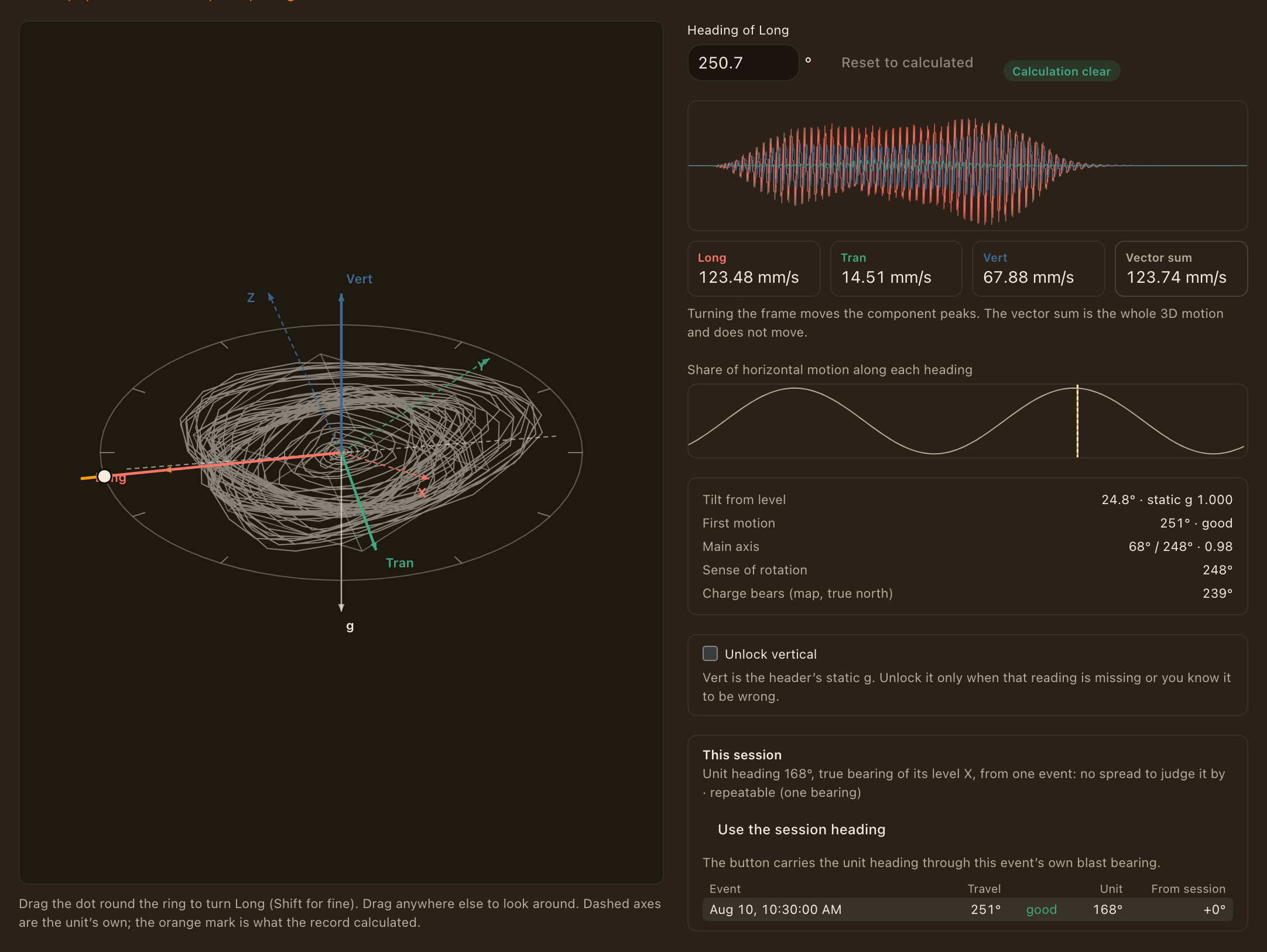
On the left is the unit with its own X Y Z axes (dashed), the pull of gravity, and a level ring. On the ring are the record's opinions about which way it travelled: the first motion, the main axis of the horizontal motion, and an orange mark for what was calculated. Over them is the Long / Tran / Vert triad being chosen. Drag the dot round the ring to turn Long; hold Shift for fine movement, or type a heading. Drag anywhere else to look around.
On the right is what that choice does:
- the three traces, re-drawn as you drag;
- the three component peaks, moving as you drag, beside the vector sum, which does not move;
- a curve of how much of the horizontal motion each heading would capture, with the calculated heading and yours marked on it. A clear peak means the record knows which way it travelled. A nearly flat curve is the honest sign that it does not.
Apply to this view changes what you see and what a link you share shows, and nothing else. Save keeps it, for this event or for the whole session (a unit does not move within a session, so its orientation is the session's unless one event says otherwise). Saving needs edit rights on the project, because once a frame is saved the analyser scores the component peaks, their frequencies and the limit verdicts in it. The record's X Y Z figures are kept as they were; they are never overwritten.
What the rest of the session says
A unit does not move within a session, so every event in it was recorded from the same position. The dialog lists the session's other events, each with the direction its own record calculated and how far that sits from the rest; an event that disagrees stands out. Where the map knows where each blast was, the list also solves the unit's heading from all of them together, and says whether that is verified across several bearings or only repeatable from one. One bearing can be consistently wrong in a way the data cannot see, for example when every arrival bends round the same bench face. Use the session heading sets the dial from it, which is the right move for an event whose own record is too weak to say.
When the record has no usable gravity reading
If a record's static g is missing, or is not one g at rest, there is no measured vertical. Unlock vertical lets you set it: the tilt from the unit's Z axis, and which way it leans. A frame with a vertical set by hand is always marked as such and is never treated as a clear calculation.
Comparing with another instrument
Download CSV (this frame) writes every sample of the event at full rate and full precision: time, X, Y, Z, and, in a Tran / Vert / Long frame, Long, Tran, Vert and the vector sum. The header records the rotation used, the heading and where it came from, the tilt, and whether analyse-api has scored that exact frame. A short summary at the end gives each channel's peak and frequency in both frames. It is meant for laying a record beside a geophone's outside the platform.
Inside it, attach the geophone's own record to the blast and pair it with this unit: the analyser then lays the two over each other on one clock, compares them component by component in Tran, Vert and Long, and the record's sheet gives the angle between our Long and the aimed geophone's, found from the two waveforms with no compass. A small angle is independent evidence that this unit's frame was resolved correctly on your ground. See Comparing with a ShockAI unit.
What reports print
Reports, trends and blast pages print component peaks as Tran / Vert / Long, where an orientation is saved. That is the default for every project. An event with a saved orientation that analyse-api has scored prints Tran / Vert / Long with a line saying how the frame was arrived at; an event without one prints X / Y / Z with the vector sum, and says why. A page never mixes the two for one record, and a trend marks which frame each point is in.
A project that wants every record as the unit wrote it chooses X / Y / Z, as recorded in its compliance settings. Everyone who can open a blast sees the frame the project chose, whether or not they are a member of the project. The peak vector sum, and any verdict against it, is the same either way.
Most orientations are saved without anyone opening the dialog. After an event is analysed, the platform saves the record's own calculation when it is clear (the good badge). When it is not, and the event is linked to a blast placed on the map, the platform uses the session's heading instead, but only when the session's other events agree on it across two or more different blast bearings. A heading seen from a single bearing is shown in the dialog as a suggestion and is never applied without a person. Nothing automatic ever replaces an orientation a person saved.
Which way along its line the motion travelled is read from the first motion: a blast starts with a push, away from the shot and upward. Far from the shot the motion arrives almost level and the upward part can be too small to read; the dialog then says that the push was taken as read. No peak, frequency or verdict depends on it, only which way the traces point.
Clipping
A recorder clips one chip axis at a time, and a rotated component is a blend of all three. So a clipped X taints every component that reads from X, and the analyser marks them. Clipping is always detected on X, Y and Z, never on the rotated traces.